Gemini and Nano Banana images: the visible mark, SynthID and what each one means
By The NeutronField editorsPublished Updated
Checked on 2026-11-02 with c2pa-rs (c2pa-python) and a JPEG segment reader
Short answer
Every image Google's Gemini models generate carries an invisible SynthID watermark in its pixels, Google says. Our Gemini API file also carried a Google-signed content credential that records that watermark, and nothing else: no EXIF or XMP fields and no prompt. The visible sparkle is a separate, app-only mark that depends on your plan.
Evidence order
Strongest first- Signed content credentialGoogle signed it, and it records how the file was made.Present
- Invisible watermarkSynthID, recorded in the credential; only Google's detector reads it.Present
- Metadata fieldsNo EXIF, XMP or IPTC block outside the credential.Absent
Status on the test file in frame 12, as the Gemini API returned it.
Our file test
One file from the Gemini API, read field by field before any resizing.

What frame 12 carries
| Signal | Yes | No |
|---|---|---|
| Content credential | marked | not marked |
| Invisible watermark | marked | not marked |
| Metadata fields | not marked | marked |
| Prompt saved in file | not marked | marked |
Checked on 2026-11-02 with c2pa-rs (c2pa-python) and a JPEG segment reader. The watermark row rests on Google's signed record in the file.
| Field | Present | Value |
|---|---|---|
| C2PA manifest | Yes | Valid; signed by Google Media Processing Services (Google LLC) |
| Claim generator | Yes | Google C2PA Core Generator Library |
| Actions recorded | Yes | Created by Google Generative AI; Applied imperceptible SynthID watermark |
| Digital source type | Yes | trainedAlgorithmicMedia (IPTC) |
| EXIF, XMP, IPTC blocks | No | None outside the credential |
| Prompt text | No | Not stored anywhere in the file |
claim_generator_info: Google C2PA Core Generator Library
signature: Es256, Google LLC, Google Media Processing Services, 2026-11-02T04:28:12Z
c2pa.created: Created by Google Generative AI.
c2pa.edited: Applied imperceptible SynthID watermark.
digitalSourceType: trainedAlgorithmicMedia
validation_state: ValidThe visible mark
The mark you can see is a small Gemini sparkle in the corner of the picture. It is added by the Gemini app, not by the model, and it is the least reliable of the four records: anyone can crop it out, and an image without it may still have come from Google.
When Google launched Nano Banana Pro in November 2025 it said the sparkle would stay on images made by free and Google AI Pro users, and come off for Google AI Ultra subscribers and in the Google AI Studio developer tool (Google, Introducing Nano Banana Pro). App settings have changed often since, so check what your own download shows. Our frame 12 came from the Gemini API and has no visible mark at all.
That split matters if you are deciding what to say about an image. A missing sparkle tells you only which product made the file and on which plan. It does not tell you a person drew it.
The invisible watermark
SynthID is Google DeepMind's watermark. It is written into the pixels as the image is generated, it does not change how the image looks, and Google says it is designed to stand up to cropping, filters and lossy compression (Google DeepMind, SynthID). For developers the rule is stated plainly: "All generated images include a SynthID watermark" (Gemini API docs, image generation).
You cannot see SynthID or read it with a metadata tool. What we could read was Google's own signed statement about it: the content credential in frame 12 lists two actions, "Created by Google Generative AI." and "Applied imperceptible SynthID watermark." That is why our record marks the watermark as present: the evidence is Google's own signed record, not a detector run.
The two records behave differently once the file moves. When we resized frame 12 and saved it as WebP for this site, the content credential disappeared completely; the WebP copies on this page carry no manifest. The watermark is meant to survive that kind of change, though Google's help page notes that after many alterations it may no longer be detected (Gemini Apps Help, verify AI-generated content). Google has also said it now adds C2PA credentials to Nano Banana Pro images in the Gemini app, Vertex AI and Google Ads (Google, AI image verification in the Gemini app); our API file from the faster Nano Banana 2 model carried one too. We repeated the test with Nano Banana Pro (gemini-3-pro-image) through the API on the same day: same signer, the same two actions, and a valid credential. For the same test on OpenAI's images, see what ChatGPT puts in your images.
Checking a Google image
If you made the image yourself, keep the file Gemini gave you. The original is the only copy that still has the credential, and it is what you would point to if anyone asks how the picture was made.
Start from the original download, not a screenshot or a copy saved from a chat or social feed; those are re-encoded and lose the credential.
Open a content credential viewer, such as the free one from the Content Authenticity Initiative, and load the file. A Gemini file shows Google LLC as the signer and lists the actions above.
To check for SynthID, upload the image to the Gemini app and ask whether it was created or edited by Google AI. Google allows about ten image checks in any 24 hours, and the app also reads Content Credentials on the web and on Android (Gemini Apps Help).
Note the date and the result next to the file, the same way we date every record on this site. Tools and app rules change, and a dated note is what makes the check worth something later.
What this can and cannot prove
A valid Google credential shows that Google signed a statement about the file and that the pixels have not changed since. Detecting SynthID shows that Google's models made or edited all or part of the image. Neither tells you who wrote the prompt, whether a person edited the picture afterwards in another tool, or whether a version without these records exists elsewhere.
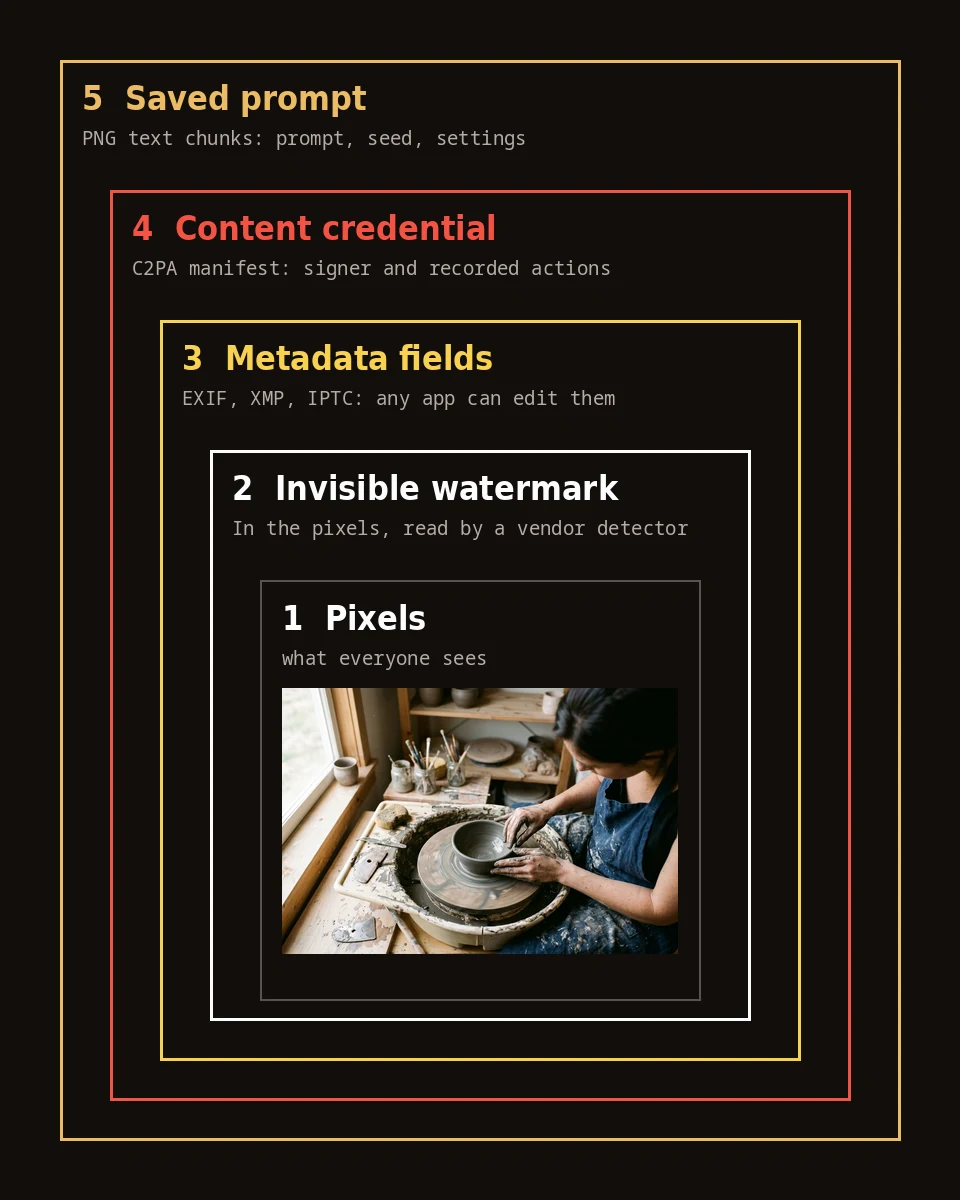
The absence of every record proves the least. A screenshot of a Gemini image carries no credential, and a heavily altered copy may lose the watermark too. For other generators, start at the Made with AI hub, and for the four layers in general, what your AI image carries.
A missing label does not mean an image is human-made.
Sources
- Gemini API docs: Image generation (accessed 2026-11-02)ai.google.dev
- Google: Introducing Nano Banana Pro, 2025-11-20 (accessed 2026-11-02)blog.google
- Google: How we're bringing AI image verification to the Gemini app, 2025-11-20 (accessed 2026-11-02)blog.google
- Gemini Apps Help: Verify AI-generated images, videos, and audio (accessed 2026-11-02)support.google.com
- Google DeepMind: SynthID (accessed 2026-11-02)deepmind.google
Questions
Do all Nano Banana images have a watermark?
Yes, an invisible one. Google's developer documentation says all images generated through the Gemini API include a SynthID watermark, and Google says the same of media from its consumer tools. The visible sparkle is separate and appears only on some Gemini app images.
Is the Gemini sparkle the only watermark?
No. The sparkle is a visible mark the Gemini app adds on some plans. Every image also carries SynthID, an invisible watermark in the pixels, and files we tested also carried a signed content credential from Google.
Do Gemini API images have a visible watermark?
Our file from the Gemini API on 2026-11-02 had none, and Google said at the Nano Banana Pro launch that the visible mark comes off in the Google AI Studio developer tool. The invisible SynthID watermark is still there.
Does resizing a Gemini image remove the watermark?
Resizing removed the content credential from our copy completely. SynthID is designed to survive resizing, recolouring and compression, though Google says that after many alterations it may no longer be detected.
How can I tell if an image came from Gemini?
Upload it to the Gemini app and ask whether it was created or edited by Google AI; the app checks for SynthID and reads content credentials. If you have the original file, a content credential viewer shows Google's signed record.
Related reading
- PromptsPrompts for ChatGPT and Gemini images: talking to a chat-based image modelWrite to ChatGPT and Gemini in plain sentences, not tag lists: say what the picture shows, where, in what light and medium, and the one detail that must be right.
- Made with AIWhat your AI image carries: credentials, watermarks, metadata and the prompt itselfAn AI-generated image file can carry four records: a signed content credential, an invisible watermark in the pixels, ordinary metadata fields, and the prompt saved as text.
- Made with AIAI video from prompts: what video models put in a clip, and what our Kling file heldVideo generators label clips in different places.