What your AI image carries: credentials, watermarks, metadata and the prompt itself
By The NeutronField editorsPublished Updated
Checked on 2026-11-02 with c2pa-rs (c2pa-python) and JPEG and PNG segment readers
Short answer
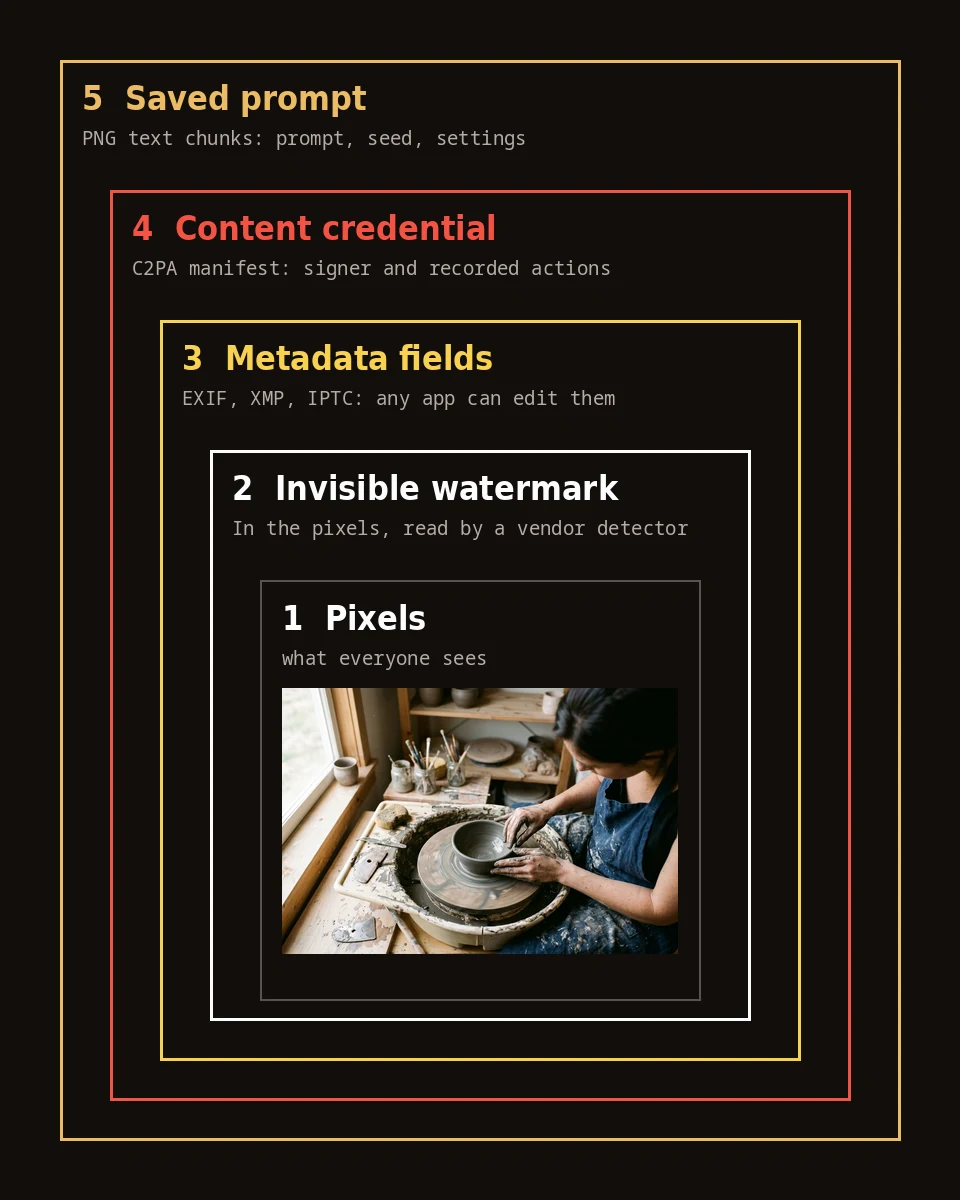
An AI-generated image file can carry four records: a signed content credential, an invisible watermark in the pixels, ordinary metadata fields, and the prompt saved as text. The three files we tested from Google and OpenAI each carried a signed credential and, by their makers' account, a watermark, but no other metadata and no prompt.
Evidence order
Strongest first- Signed content credentialWho signed the file, and the steps they recorded.3 of 3 files
- Invisible watermarkRecorded in all three credentials; only the maker's detector reads it.3 of 3 recorded
- Metadata fieldsNo EXIF, XMP or IPTC block outside the credential.0 of 3 files
- Prompt saved in fileThe words you typed, stored as text.0 of 3 files
Totals across our three test files from 2026-11-02, before any conversion.
Three files, read layer by layer
One image each from three models, read exactly as the APIs returned them.

What frame 32 carries
| Signal | Yes | No |
|---|---|---|
| Content credential | marked | not marked |
| Invisible watermark | marked | not marked |
| Metadata fields | not marked | marked |
| Prompt saved in file | not marked | marked |
Checked on 2026-11-02 with c2pa-rs (c2pa-python) and JPEG and PNG segment readers. Frame 32 is Nano Banana Pro through the Gemini API. The watermark row rests on Google's signed record in the file.
| Layer | Gemini API, Nano Banana 2 (frame 12) | Gemini API, Nano Banana Pro (frame 32) | OpenAI image API (frame 31) |
|---|---|---|---|
| Content credential | Yes, signed by Google LLC; valid | Yes, signed by Google LLC; valid | Yes, signed by OpenAI; hash matches, signer not on our default trust list |
| Watermark step recorded | Applied imperceptible SynthID watermark | Applied imperceptible SynthID watermark | c2pa.watermarked.unbound |
| Source type | trainedAlgorithmicMedia, in the credential | trainedAlgorithmicMedia, in the credential | trainedAlgorithmicMedia, in the credential |
| EXIF, XMP, IPTC, text chunks | None | None | None |
| Prompt in the file | No | No | No |
| Format and size | JPEG, 1264 by 848 | JPEG, 1264 by 848 | PNG, 1536 by 1024 |
claim_generator_info: Google C2PA Core Generator Library
signature: Es256, Google LLC, Google Media Processing Services, 2026-11-02T05:33:09Z
c2pa.created: Created by Google Generative AI.
c2pa.edited: Applied imperceptible SynthID watermark.
validation_state: ValidThe four layers
1. The content credential
A content credential is a signed record stored inside the file, written to the open C2PA standard (C2PA specification 2.2). It names the company that signed it, lists the steps it recorded (created, edited, converted), and holds a hash of the image so a viewer can tell whether the pixels changed after signing. All three of our files had one: two signed by Google, one by OpenAI.
2. The invisible watermark
A watermark is a signal hidden in the pixels themselves. Google's is called SynthID and is designed to survive cropping, filters and compression (Google DeepMind, SynthID); OpenAI says its images carry SynthID too (OpenAI Help, C2PA and SynthID). You cannot see it or read it with a metadata tool. What we could read was each credential's own note that a watermark had been applied.
3. Metadata fields
These are the ordinary fields cameras and editors write: EXIF, XMP and IPTC. One IPTC value matters here: the digital source type "trainedAlgorithmicMedia", defined as media "created algorithmically using an Artificial Intelligence model trained on captured content" (IPTC Digital Source Type). Our three files carried that value only inside the credential, with no separate metadata block, so it disappears with the credential.
4. The prompt in the file
The PNG format has text chunks (tEXt, zTXt and iTXt) for keyword and value pairs (W3C PNG specification), which is where a tool can store the prompt and settings in plain text. None of our three files did. Open-model front ends for Stable Diffusion and Flux are where this record is usually found; that test goes on the Stable Diffusion and Flux page.
What strips each layer
The layers fail in a predictable order. The credential, the metadata fields and any saved prompt live outside the pixels, so anything that writes a new file can drop them: a screenshot, an export from an editor, a chat app or social feed that re-encodes uploads. When we resized our Gemini file and saved it as WebP, and when we re-saved our OpenAI PNG as a JPEG, the credential vanished both times.
The watermark is the one layer built to stay. Because it is part of the image, it can outlast a resize or a re-save, though both Google and OpenAI say heavy changes can weaken it until it is no longer found. That makes the original download the copy worth keeping: it is the only one that still holds every layer.
Edits add their own records. A tool that signs edits can append a new step to the credential, and IPTC has a separate source type, "compositeWithTrainedAlgorithmicMedia", for media edited with generative AI, such as inpainting. Our edited with AI page covers what happens when generative fill touches a real photo.
Check a file yourself
You need the original file and a few minutes.
Open the original download in a content credential viewer such as Content Credentials Verify. Note the signer and the actions it lists.
Open the same file in any metadata viewer (most operating systems show EXIF and XMP in the file's info panel) and note what, if anything, sits outside the credential.
For a PNG, look for text chunks; a viewer that lists PNG chunks will show tEXt or iTXt entries if a prompt was saved.
For the watermark, use the maker's own checker: the Gemini app for Google images, and OpenAI's verification page for OpenAI images. Then write the date next to what you found.
What each layer can and cannot prove
A valid credential shows who signed a statement about the file and that the pixels have not changed since. A detected watermark shows that the maker's model produced all or part of the image. Metadata fields show only what some software wrote, and any editor can change them. A saved prompt shows the words a tool recorded, not that those words alone made this exact picture.
None of them proves who made the image, or whether a person edited it afterwards, and the absence of all four proves nothing at all. For each generator in detail, see ChatGPT images and Gemini and Nano Banana; for everything in this section, the Made with AI hub. How we read each file is set out on our About page.
A missing label does not mean an image is human-made.
Sources
- C2PA Technical Specification 2.2 (accessed 2026-11-02)c2pa.org
- IPTC NewsCodes: Digital Source Type (accessed 2026-11-02)cv.iptc.org
- W3C: Portable Network Graphics (PNG) Specification, Third Edition (accessed 2026-11-02)w3.org
- Google DeepMind: SynthID (accessed 2026-11-02)deepmind.google
- OpenAI Help: C2PA and SynthID in OpenAI-generated images (accessed 2026-11-02)help.openai.com
- Gemini API docs: Image generation (accessed 2026-11-02)ai.google.dev
Questions
What metadata does an AI image have?
In our tests of Google and OpenAI files, almost none outside the signed content credential: no EXIF, XMP or IPTC block and no prompt. The credential itself holds the signer, the steps recorded and the IPTC source type trainedAlgorithmicMedia.
Can you tell an image is AI-generated from its metadata?
Sometimes, if the original file still carries a content credential or a source type that says so. Most shared copies have lost those records, so their absence tells you nothing.
What is an invisible watermark?
A signal hidden in the pixels rather than stored beside them. Google's SynthID is designed to survive cropping, filters and compression, and OpenAI says its images carry SynthID as well. Only the maker's detector can read it.
Does screenshotting remove the metadata?
Yes. A screenshot is a new file, so the credential, metadata fields and any saved prompt are gone. An invisible watermark may still be detectable, because it is part of the image.
Is the prompt saved in AI images?
Not in any of the three files we tested from Google and OpenAI. PNG files can hold text chunks, and some open-model tools use them for the prompt and settings; we cover that on the Stable Diffusion and Flux page.
Related reading
- Made with AIWhat ChatGPT puts in your images: content credentials, and when they surviveOpenAI says every image made with ChatGPT, Codex or its API carries two records: a signed C2PA content credential and an invisible SynthID watermark.
- Made with AIGemini and Nano Banana images: the visible mark, SynthID and what each one meansEvery image Google's Gemini models generate carries an invisible SynthID watermark in its pixels, Google says.