Prompts for ChatGPT and Gemini images: talking to a chat-based image model
By The NeutronField editorsPublished Updated
Run on OpenAI image API (gpt-image) and Gemini API (gemini-3.1-flash-image), 2026-11-02
Short answer
Write to ChatGPT and Gemini in plain sentences, not tag lists: say what the picture shows, where, in what light and medium, and the one detail that must be right. Name anything you do not want, quote any words exactly, then fix small things in a follow-up turn instead of starting again.
frame 13A
▸ 13ANF 04
Prompt anatomy
Chat image models read your request the way they read any message, so full sentences work better than a list of tags. Google's own guidance for its image models is to describe a scene in rich detail, because the more specific you are, the more control you have (Gemini API docs). Five parts cover most requests. The same structure carries over to photorealistic prompts and to art style words.
One prompt, five parts
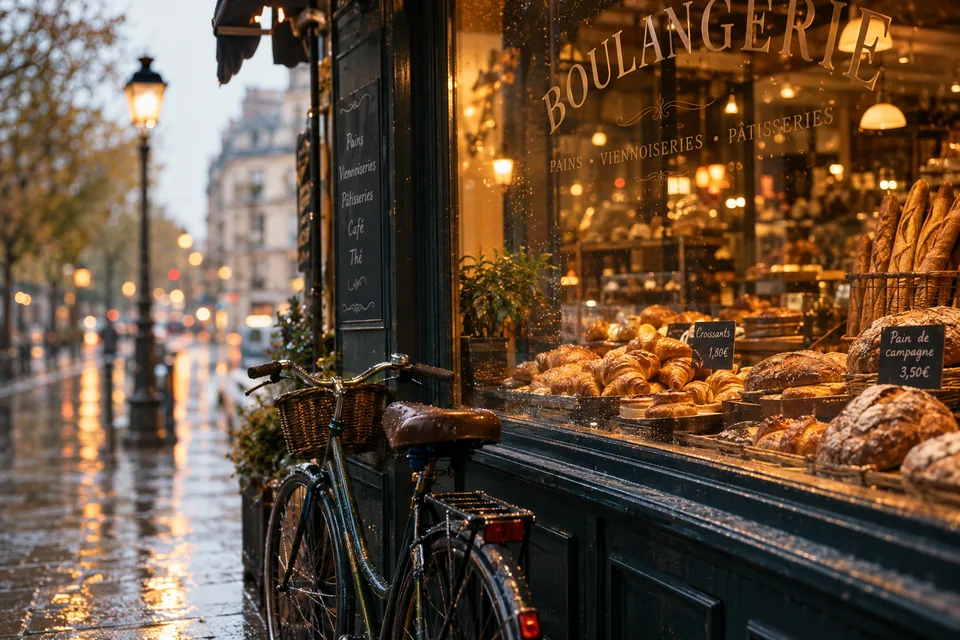
An old green bicycle leans against the window of a small bakeryon a rainy morning. Inside, warm lamplight falls on shelves of bread; outside, the street is grey and wet. Make it look like a 35mm photograph taken from across the street, with the bicycle in sharp focus.
1SubjectWhat the picture is of, in one clause.
2SettingWhere and when.
3LightWhere it comes from, and its colour.
4MediumPhoto, painting, print, and the viewpoint.
5PriorityThe one thing that must come out right.
Worked examples
EXAMPLE 1
A keyword list against a sentence
The same scene asked for twice on the same model: once as a comma-separated list of tags, once as two plain sentences.
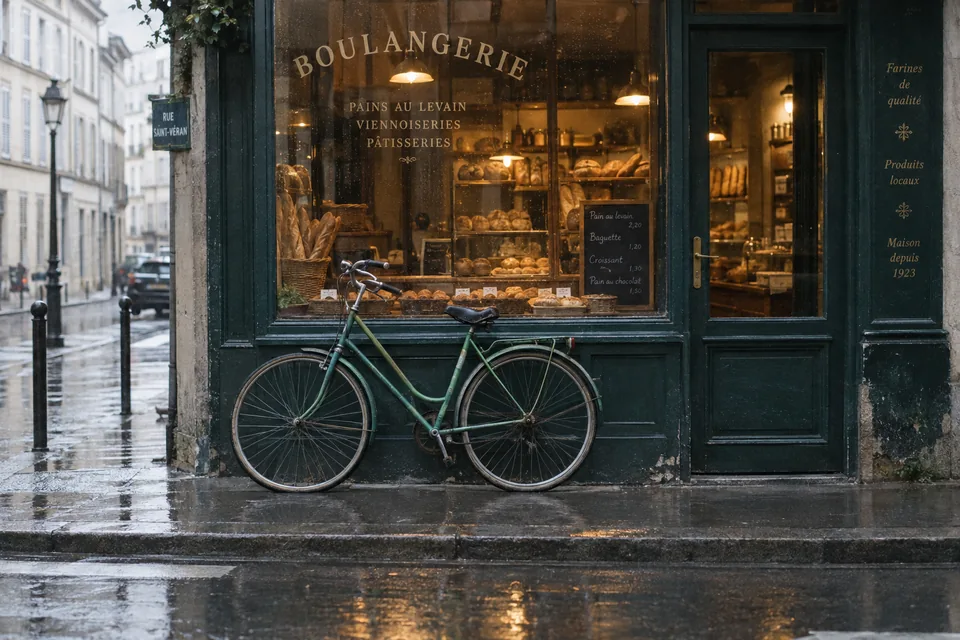
An old green bicycle leans against the window of a small bakery on a rainy morning. Inside, warm lamplight falls on shelves of bread; outside, the street is grey and wet. Make it look like a 35mm photograph taken from across the street, with the bicycle in sharp focus.
Run on OpenAI image API (gpt-image) · 2026-11-02
frame 13
▸ 13NF 04 · REJECT
frame 13A
▸ 13ANF 04 · KEPTkeeper
Frames 13 and 13A: same model, same day, only the wording changed. Frame 13A kept; frame 13 rejected.
Model
gpt-image (API)
Aspect
3:2
Size
1536 by 1024
Seed
Not exposed
Frame 13A is kept: the sentence version got every detail it named, a green bicycle in focus seen from across the street, while the tag list gave a generic bakery and lost the bicycle at the edge. Tags like 8k and highly detailed changed nothing we could see.
EXAMPLE 2
The same sentences on two chat models
The sentence prompt from example 1, sent unchanged to Google's model.
Prompt · frames 13A and 14A
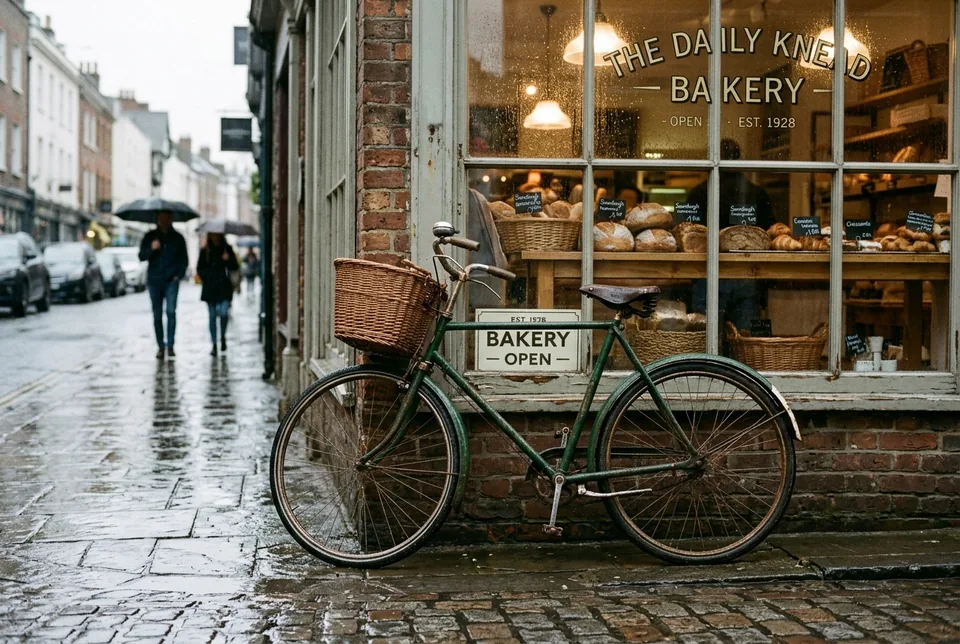
An old green bicycle leans against the window of a small bakery on a rainy morning. Inside, warm lamplight falls on shelves of bread; outside, the street is grey and wet. Make it look like a 35mm photograph taken from across the street, with the bicycle in sharp focus.
Run on OpenAI image API (gpt-image) · 2026-11-02 (13A); Run on Gemini API, gemini-3.1-flash-image (Nano Banana 2) · 2026-11-02 (14A)
frame 13A
▸ 13ANF 04 · KEPTkeeper
frame 14A
▸ 14ANF 04
Frames 13A and 14A: one prompt, two models. We discarded Gemini's first take (frame 14) because it painted the name of a real bakery chain on the window.
Models
gpt-image; gemini-3.1-flash-image
Aspect
3:2
Edits
None, single turn
Seed
Not exposed
Both models followed the sentences closely. Gemini added a basket, passers-by and a shop name we did not ask for; if the details matter, say what should not be there in plain words.
EXAMPLE 3
Words inside the picture
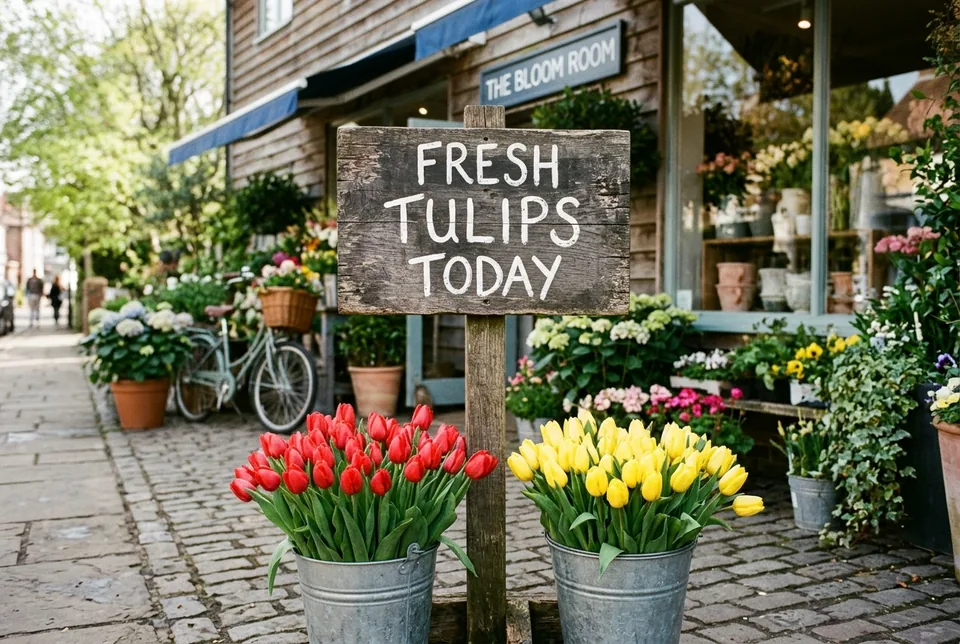
Chat models are often asked for signs, labels and posters. We asked both for a three-word sign.
Prompt · frames 15 and 15A
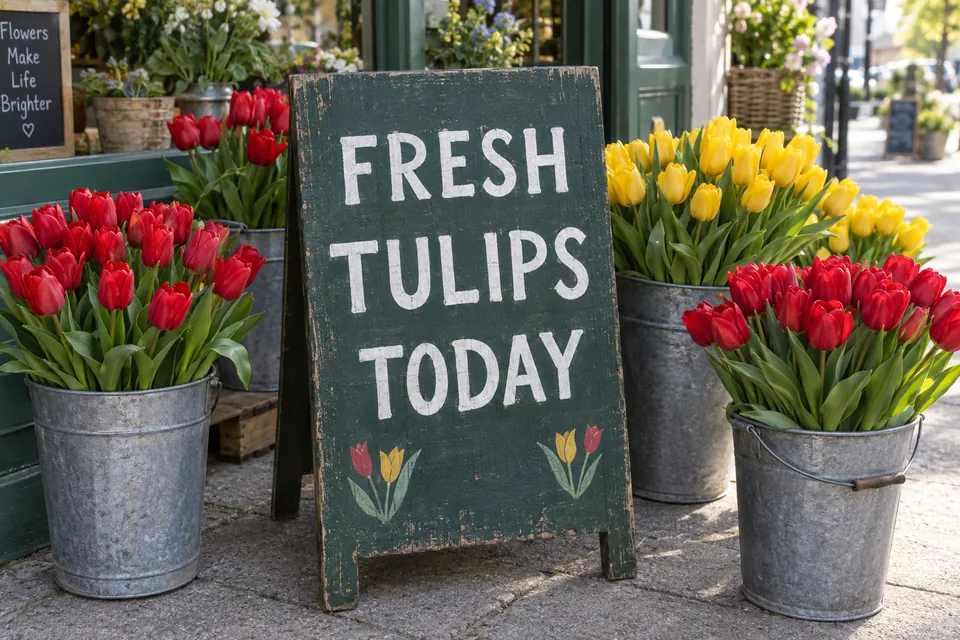
A hand-painted wooden sign stands outside a flower shop. In white capital letters it reads exactly: FRESH TULIPS TODAY. Buckets of red and yellow tulips sit around it on the pavement in soft morning light. Photographic, eye level.
Run on OpenAI image API (gpt-image) · 2026-11-02 (15); Run on Gemini API, gemini-3.1-flash-image (Nano Banana 2) · 2026-11-02 (15A)
frame 15
▸ 15NF 04 · KEPTkeeper
frame 15A
▸ 15ANF 04
Frames 15 and 15A: both spelled the sign correctly. Frame 15 kept for the closer framing.
Models
gpt-image; gemini-3.1-flash-image
Aspect
3:2
Quoted text
3 words, capitals
Seed
Not exposed
Both rendered the three words exactly. Both also added text we did not ask for: a second chalkboard slogan in frame 15, a shop name in frame 15A. Quote the words you want, and say there should be no other writing.
Settings that matter
What you can set, as of 2026-11-02, from each vendor's documentation.
Setting
What it does
Where
Aspect ratio
Shape of the frame; say it in the prompt in the chat apps, or set it in the API
ChatGPT, Gemini, both APIs
Follow-up turns
Edit the last image with a new instruction instead of starting again
ChatGPT, Gemini; OpenAI Responses API; Gemini API
Revised prompt
OpenAI's chat model may rewrite your prompt before drawing; the API returns the rewritten text
OpenAI Responses API
Output format
PNG, JPEG or WebP, with a compression level for the lossy ones
OpenAI API
Resolution
Larger sizes on request; Google lists 1K, 2K and 4K for its current models
Both APIs
Seed
Not offered: the same prompt gives a new picture every time
Neither, in our runs
Common mistakes
Writing tags, not sentences
Lists like "cinematic, 8k, highly detailed" are a habit from older models. In example 1 they cost us the subject.
Leaving the extras open
Unasked-for signs, people and logos appear when you do not rule them out. Say "no other text" or "an empty street" if you mean it.
Starting over to fix one thing
Both chat apps can edit the last image. Ask for the one change ("make the bicycle red") rather than rewriting the prompt.
Trusting text placement
OpenAI says its model can still struggle with precise text placement and clarity (OpenAI API docs). Keep signs short and check every letter.
frame 13A
▸ 13ANF 04 · KEPT
What frame 13A carries
Signal
Yes
No
Content credential
marked
not marked
Metadata fields
not marked
marked
Prompt saved in file
not marked
marked
Checked on 2026-11-02 with c2pa-rs (c2pa-python). Signed by OpenAI; the credential records a watermark step. Every Gemini frame on this page carried Google's signed credential instead.
Describe the picture in two or three plain sentences: subject, setting, light, medium and the one detail that must come out right. In our test a sentence prompt kept every named detail that a tag list lost.
Do the same prompts work in Gemini?
Yes, in our runs the same sentences worked on both. Gemini added more unrequested details, such as people and a shop name, so say plainly what should not appear.
Can ChatGPT and Gemini put text in images?
Both spelled a three-word sign correctly for us. Both also added extra writing we had not asked for, and OpenAI notes its model can still struggle with precise text placement, so keep text short and check it.
Can I get the same image twice?
Not reliably. Neither chat model gave us a seed to reuse, so the same prompt draws a new picture each time. Keep the image you like and edit it in a follow-up turn.
Does ChatGPT change my prompt?
It can. OpenAI's documentation says the chat model may revise your prompt before generating, and its API returns the revised text so developers can see what was actually drawn.
Is my prompt saved in the image file?
No. Our files from both vendors carried a signed content credential but no copy of the prompt.